Racket Science
Dr. RocketOctober 2026
What Dr. Rocket is
Waterloo’s first-year computer science courses, CS 135 and CS 145, teach programming in Racket, and possibly other schools do too. Students write in the teaching languages (Beginning Student, Intermediate Student and their relatives) inside DrRacket, the IDE that ships with Racket. DrRacket is careful and correct, and it is dated. In the words of Dr. Rocket’s README, it “looks and feels like it was built a long time ago.”
Dr. Rocket is a modern rendition of it, written in Rust. It reads and writes the same files, runs them on the real Racket, using Racket’s own stepper, check syntax, debugger and test engine. Around them it puts a GPU-drawn editor with tabs, a file tree, a formatter, a terminal and vim keys, and a Visualizer that draws a program while it runs.
Most of it was written on the first two days. The core editor, the Racket backend and the terminal landed within the first hour, merged from several parallel branches. The Visualizer arrived the same afternoon, and the first beta went out that evening. The days after that were for parity with DrRacket, and for hardening.
Rust draws, Racket decides
Dr. Rocket is one Rust app and three kinds of Racket process. The app is drawn with egui, an immediate-mode UI that repaints the whole window each frame. It owns the text, the editing and every pixel. In the words of its design notes, “the Rust side never guesses semantics”: anything that needs Racket’s own answer goes to Racket.
One server per app checks syntax, finds bindings and serves the documentation; a newer check cancels an older one. One runner per run executes the program, the debugger and the Visualizer, and a spare runner is always started in advance, so pressing Run doesn’t wait for Racket to boot. One stepper per session drives Racket’s own stepper. All of them talk to the app in JSON, one object per line, over stdin and stdout. The split keeps the rules of the teaching languages where they already live, in Racket, and lets the app drop any process that misbehaves: a server request pending for more than 30 seconds restarts the whole server.
- editor
- panels
- Visualizer
One app, three Racket processes, and nothing between them but lines of JSON.
The Visualizer
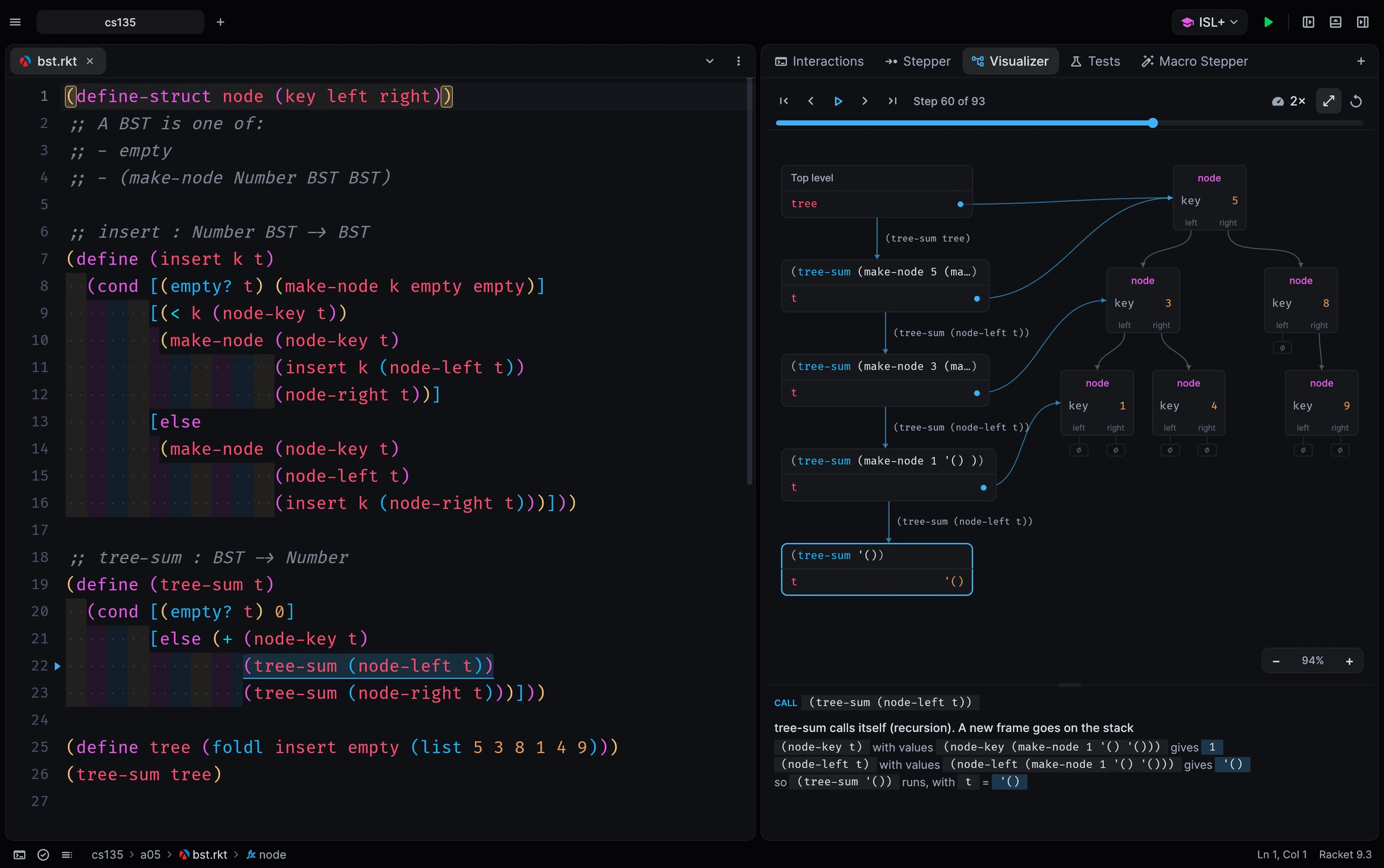
The Visualizer is the reason to switch. It runs the program once, records every call, question and value, and then lets the student scrub through the run. Each call is a card with its arguments. A waiting call shows what it will do with the answer. Structures are drawn as the boxes and arrows a course draws on the board.
Instrumenting a run
To record a run, the runner rewrites the program before it runs. It expands the code to Racket’s core forms, then walks them (annotate-expr in visualize.rkt). Every lambda the user wrote is registered as a user function. Every if test reports its answer. Every application the user wrote is split in two: first its parts are evaluated into temporaries and the call site is noted, then the call is made.
A simplified version of what one call becomes:
(let ([f fact] [a (- n 1)])
  (viz-site! pos span #f)      ; #f: not in tail position
  (if (viz-primitive? f)
      (viz-compute pos span f (list a))
      ; a user function is called as written
      (f a)))
The last line is the point. A primitive, such as -, is recorded with its arguments and its result. A call to the user’s own function is left as written, with nothing wrapped around it, so a call in tail position stays a tail call. The runner tracks tail position as it walks, including through the begin0 that the teaching languages wrap around function bodies. When a tail call happens, the new frame replaces its caller instead of stacking on top of it, and the caller records no return. That is how Racket runs it, and the Visualizer draws exactly that.
Each recorded step carries a snapshot of the values it can reach. Objects get stable ids, and an object is sent again only when it changes. A run records at most 1,500 steps and 600 objects per snapshot, so an infinite loop still ends in a picture.
Drawing a step
The app turns those steps into the picture. Nothing tells it that a node is a tree. It learns that from the data (learn_shape in visualizer/mod.rs): a struct field that points to another struct of the same type is a link, and a field that has only ever held empty or #false is an empty child slot. Any struct with links is drawn as a tree, with its children in field order. The same rule draws a list of structs as a chain and a family tree as a tree, with no configuration.
Here is the program from Dr. Rocket’s own demo:
(define-struct node (key left right))

(define (tree-sum t)
  (cond [(empty? t) 0]
        [else (+ (node-key t)
                 (tree-sum (node-left t))
                 (tree-sum (node-right t)))]))
Each call is a card. It shows the call, its argument, and the question its cond asked. When a call waits on a recursive call, its card shows the rest of its work with a hole where the answer will go. When the answer comes back, it rides up into that hole. A line joins each card to the node it holds, and anything the running call cannot reach is faded.
The bars along the bottom are the recursion graph. Its shape is the shape of the recursion: a ramp for a list, a saw for a tree. Clicking a bar jumps to that step.
Code into words
Under the picture, each step is also written out in words (explain.rs). The app reads the expression at the step’s source position and phrases it from its shape, using the values the step recorded. A predicate becomes a question and its answer. A selector becomes a possessive. A recursive call is named as recursion, and each value says where it came from: “t is node 18, which was t’s left in the previous call.”
1(define-struct node (key left right))23(define (bst-insert k t)4 (cond5 [(empty? t) (make-node k empty empty)]t is node 34 → No6 [(< k (node-key t))7 (make-node (node-key t)8 (bst-insert k (node-left t))9 (node-right t))]10 [else …]))
Is t empty?No
- Here t is node 34
- So cond moves on to the next clause
- (node-key t)→t's keystruct
- (make-node …)→a new nodestruct
- (empty? t)→t is empty
- (< k x)→k less than x
- (sub1 n)→n - 1
- (first l)→the first item of l
The phrasing follows the course’s own vocabulary, so the text under the picture reads like the explanation a teaching assistant would give at the board.
Choreographing a step
A step can change several things at once: a question fades, a value appears, a card moves. The app plays all of them inside one 600 ms transition. While the program plays, the transition shrinks to 0.85 s divided by the speed, so at 8× a step takes 85 ms. Each part reads its own window of that transition through a small function, phase, which eases it with a cubic ease-out.
On a return, the old question fades in the first quarter while the value appears. The value then travels up the connector between 20% and 75% of the transition as the caller’s border turns green, and it fills the hole only after it lands. Cards glide to new positions over 350 ms. If the next step arrives mid-glide, each card restarts from where it is drawn at that moment, not from where the last layout put it, so nothing jumps.
The editor core
The editor is written from scratch, because a Racket editor needs to know Racket at every keystroke: where a form starts, which bracket matches which, and what DrRacket would indent. Four pieces show how it is built.
Relexing one keystroke
The editor keeps the whole file as a flat list of tokens. Each token has its range, its kind, its bracket depth and the index of its matching bracket. Colouring, bracket matching, indentation and the formatter all read from that list, so it must be right after every edit, and it must be cheap to keep right.
After an edit, the lexer (relex in lexer.rs) restarts one token before the first token the edit touches, and further back if that token is not a safe place to start, such as the middle of a string escape. It lexes forward from there. Past the edit, it compares each new token with the old token at the same place, shifted by the length the edit added or removed. As soon as the two match, the rest of the file is known to be unchanged: the old tail is kept, shifted, and its bracket partners are renumbered. Up to 16 pending edits are applied this way; more than that, and a full lex is cheaper.
Incremental lexers are easy to get subtly wrong, so this one is checked against the slow way. A test makes 100,000 random edits, in 4,000 rounds of 25, using the fragments most likely to break a lexer: a block comment opened and never closed, a lone quote, a here-string, a #lang line, a λ. After every edit, the token list must equal a full lex of the text, down to depths and bracket partners.
A formatter that searches
The formatter reindents code to the Racket style guide. Most formatters print a tree with fixed rules. This one searches. For each form that doesn’t fit on one line, it tries the layouts that form allows (all on one line, the arguments lined up under the first, or everything indented under the head) and scores each one. The score is a pair: first, how many columns run past the guide, then how many lines it uses. The lowest pair wins, so a layout never overflows to save a line.
(above/align "left" (text "Launch window open" 24 "navy") rocket)(above/align "left" (text "Launch window open" 24 "navy") rocket)
(above/align "left" (text "Launch window open" 24 "navy") rocket)
Each kind of form has a shape. A call lines its arguments up. define and lambda keep their headers on the first line and indent their bodies. cond stacks its clauses. Renders are memoised by form, column and context, so the search stays fast on long files.
The formatter must never change a program. After formatting a form, it lexes the result and compares it with the original, token by token. If any kind or text differs, it leaves that form as it was. The tests run it at widths of 40, 80 and 102 columns, including on real student code, and check that the output is idempotent and that DrRacket’s own indenter leaves it unchanged.
An image is one character
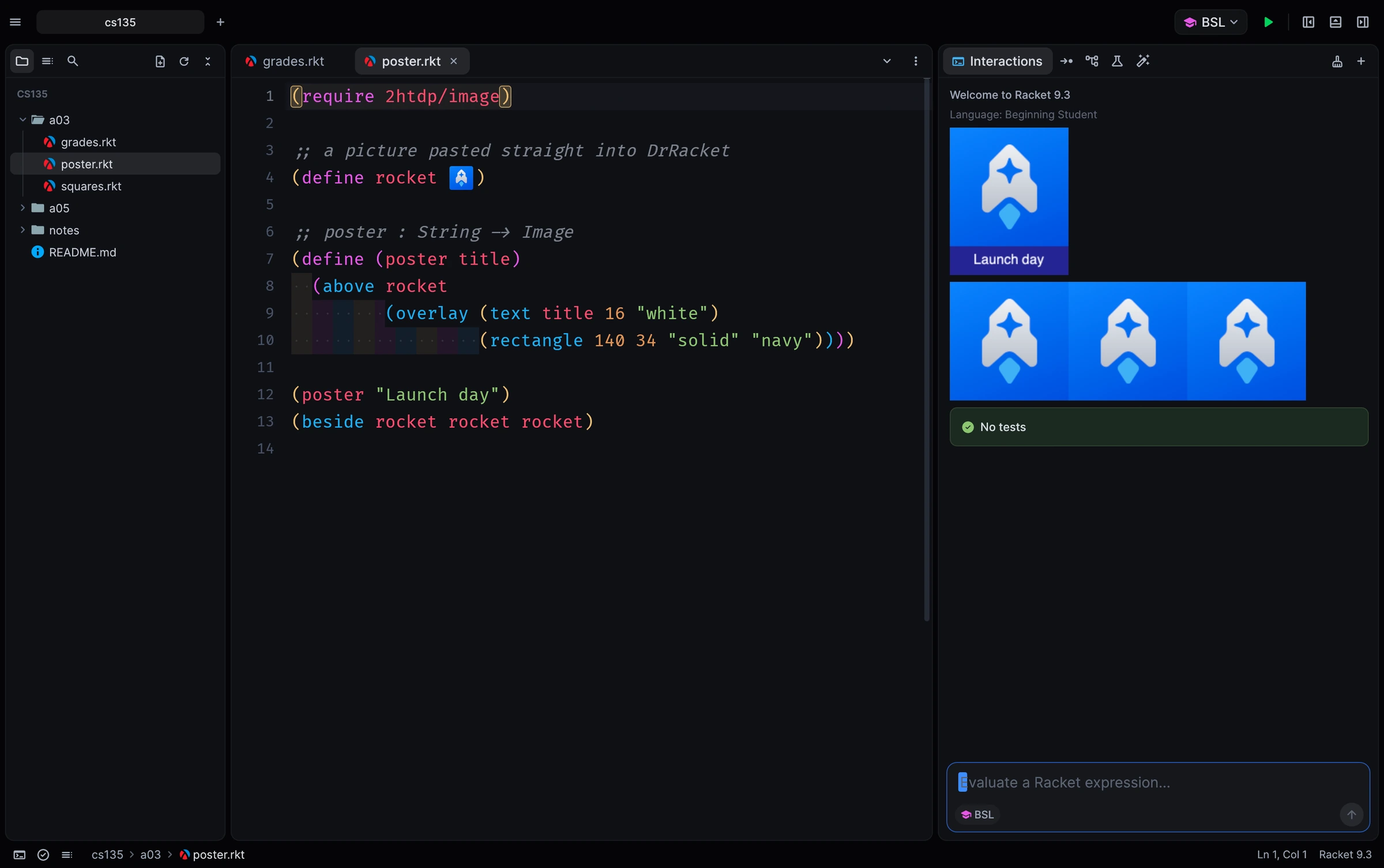
Racket’s teaching languages treat images as values: a student can paste a picture into the code and pass it to a function. DrRacket can do this because its editor holds snips, objects that sit in the text like characters. In a plain text editor, an image breaks every assumption that a character is a character.
Dr. Rocket avoids the problem by making an image a character. Each pasted image gets a code point from a Private Use Area, between U+F0000 and U+FFFFD, and a table maps that character to the image’s bytes. To the rope, the cursor, undo, deletion, and copy and paste, the image is one ordinary character. Only the painter knows: it draws the character as a single space, widened by exactly the thumbnail’s width, and draws the picture over it.
At the boundaries, the character becomes an image again. On a run, the runner feeds the program through a port that carries special values, so Racket’s reader sees a real image where the character was. On save, the file is written in DrRacket’s own format. When two pasted images claim the same code point, the clipboard renumbers the newcomer.
Arrows that survive typing
Hovering over a name draws arrows from where it is bound to each of its uses, as DrRacket does. The arrows come from Racket’s check syntax, which reports them as character offsets. The first keystroke makes those offsets stale, but the editor does not throw them away. It maps both ends of every arrow through each edit, the same way it maps the cursor, so text typed above a binding carries its arrows down with it.
Each edit restarts a 0.45 s countdown to the next check. A new check cancels one still running, and a result for an older version of the text is dropped. Half-typed code is briefly wrong, so an error inside the form being typed is held until the cursor leaves that form.
Running student code
Running a student’s program is where an IDE for beginners earns trust. The program will loop, run out of memory and fail in ways the student doesn’t yet understand. Four details show how the runner handles it.
Pause, don't kill
Both IDEs limit a program’s memory. When DrRacket’s limit is reached, it shuts the program down, and the student loses the run. Dr. Rocket pauses it instead and asks.
The runner notes Racket’s memory use just before the program starts and checks it every 25 milliseconds. If the program is over the limit, it first collects garbage and checks again, since garbage counts until it is collected. If the program is still over, the runner walks the program’s custodian tree and suspends every running thread it finds. It remembers exactly which threads it suspended, and when the student raises the limit and continues, it resumes only those. Threads the program had suspended itself stay suspended.
The test for this sets a 64 MB limit and allocates 100 MB. The run pauses, the test raises the limit to 512 MB, and the program finishes and prints 100.
Debugging unsaved files
Students split assignments across files, and they debug with all of them open and half of them unsaved. In DrRacket, a required file is loaded from disk, so a breakpoint in an unsaved edit is never reached.
When Dr. Rocket starts a debug run, it sends the text of every other open tab with it. The runner replaces Racket’s module loader with its own. When the program requires a file that is open in a tab, the loader reads the tab’s text from a string instead of the file, then expands it, annotates it for the debugger and evaluates it. Breakpoints and stepping work in every open file, as the student sees it.
Files graders can read
A teaching-language file starts with three lines that DrRacket writes: two comments and a reader line that records the language and its settings. Course tools read these lines, so Dr. Rocket writes them exactly as DrRacket does.
DrRacket 9.3’s header for a new Beginning Student file, which Dr. Rocket writes byte for byte:
;; The first three lines of this file were inserted by DrRacket. They record metadata
;; about the language level of this file in a form that our tools can easily process.
#reader(lib "htdp-beginner-reader.ss" "lang")((modname a01q1) (read-case-sensitive #t) (teachpacks ()) (htdp-settings #(#t constructor repeating-decimal #f #t none #f () #f)))Getting this right meant reproducing Racket’s printer for the values in that line, including how it quotes a symbol: a module named two words is written |two words|. A small reader parses existing headers, and opening and saving a file keeps its header bytes untouched. One test saves a file and loads it in plain Racket the way a grader does, then checks that (double 21) is 42.
Only what you wrote
The debugger shows the local variables of each frame. Expanded teaching-language code has more variables than the student wrote: the language introduces its own, with names like test1651 and repl?. Those borrow the source location of the form behind them, so a location alone can’t tell them apart from the student’s.
The runner uses a simpler test (user-written? in runner.rkt): the text at the identifier’s position must spell the identifier’s name. A variable the student typed passes, because that is where they typed it. A variable the language made up points at text that says something else, and is hidden.
In the test, a frame of (pow b (sub1 e) (* acc b)) shows exactly b, e, acc and pow, and nothing else.
Stepping like DrRacket
Dr. Rocket does not write its own stepper. It runs DrRacket’s stepper in a Racket process and streams each reduction to the editor as JSON, pausing every 500 steps until the editor asks for more. By default, every step matches DrRacket’s. A test steps (is-list? (cons 'a (cons 'b empty))) and compares the result with DrRacket 9.3’s stepper window, step for step.
Matching DrRacket also meant matching how it prints. DrRacket builds its print settings in its GUI thread, where built lists print as list, so (cons 'b '()) appears as (list 'b) even in Beginning Student. Dr. Rocket forces the same setting.
(define (f x y t) (cond [(< y x) 0] [(= y x) 1] [else (add1 (f x (- y t) t))]))(f 5 17 3)
(f 5 17 3)(cons 'a (cons 'b '()))→(cons 'a (list 'b))→(list 'a 'b)A recursive function makes a long trace, so an opt-in setting, the functional step trace, shortens it. The stepper holds back the reductions between two calls of a user function and shows them as one step, keeping the expression around the call. After the last call, the remaining reductions are shown in full.
A robot that films the app
Dr. Rocket can be driven by a script: a JSON file of steps that opens files, types, clicks, scrubs the Visualizer, waits for a run to finish and records video. The same scripts test updates in CI, run the benchmarks and film the website’s videos. Filming on the wall clock drops frames whenever one is slow to draw, so while recording, the app runs on a virtual clock instead. Frame n is told the time is the start plus n/30 of a second, however long it took. Frames pass through a channel that holds four, so a slow encoder slows the app rather than losing frames.
A real terminal
Dr. Rocket includes a terminal; even installing a Racket package runs in a terminal tab. It is a real terminal: a pseudo-terminal running the user’s login shell, and alacritty’s parser for the escape sequences. The hard part is drawing it in an immediate-mode UI, which rebuilds the whole frame every time.
Laying out a full screen of text every frame is too slow, so the terminal caches each row’s layout, keyed by a hash of the row’s cells and the font. Most frames reuse almost every row. egui sometimes rebuilds its glyph atlas, which invalidates every cached layout. The terminal notices this when the atlas’s fill ratio drops, and flushes the cache.
Box-drawing characters are not drawn from the font at all. A glyph rarely fills its cell, including the line spacing, so the borders in tools like htop and tmux show gaps. The terminal draws about seventy of these characters itself, as rectangles: each character is a set of arms (up, right, down, left), each light, heavy or double, and a light line is a ninth of the cell’s width, at least one pixel. The arms reach the cell edges, so neighbouring characters join without a seam.
Shipping it
Students install Dr. Rocket on their own laptops, so it updates itself, and it has to do so safely. Each update is signed with Ed25519 by a key built into the app. The signature covers a fixed tag, then the version, the platform, the download’s SHA-256 and its URL, one per line, so changing any of them breaks it, and nothing signed for another purpose passes as an update. The archive is checked when it arrives and again just before install, and a downloaded program is never run. To install, the app renames itself aside, moves the new copy into place, and renames itself back if anything fails.
1.0.0-beta.5
mac
9f2c…e41a
https://…
One more safety net runs at launch. On Windows and Linux, a launch that finds the previous one crashed before painting steps down a list of renderers, from the default to software, and remembers the one that works.
What it can't do yet
The Visualizer records at most 1,500 steps, so a long run is cut short and says so. A large structure is drawn in part. Dr. Rocket needs Racket installed, since it runs every program on the real thing. And some claims are still only claims: the editor’s comment that a keystroke relexes in 0.2 ms comes with a benchmark that prints a number but checks none.
Several features didn’t fit here and deserve a line each: a vim mode with counts, operators and text objects; undo that groups typing the way a person expects; and exact fractions printed as repeating decimals, so 1/3 shows as 0.3 with a bar over the 3.